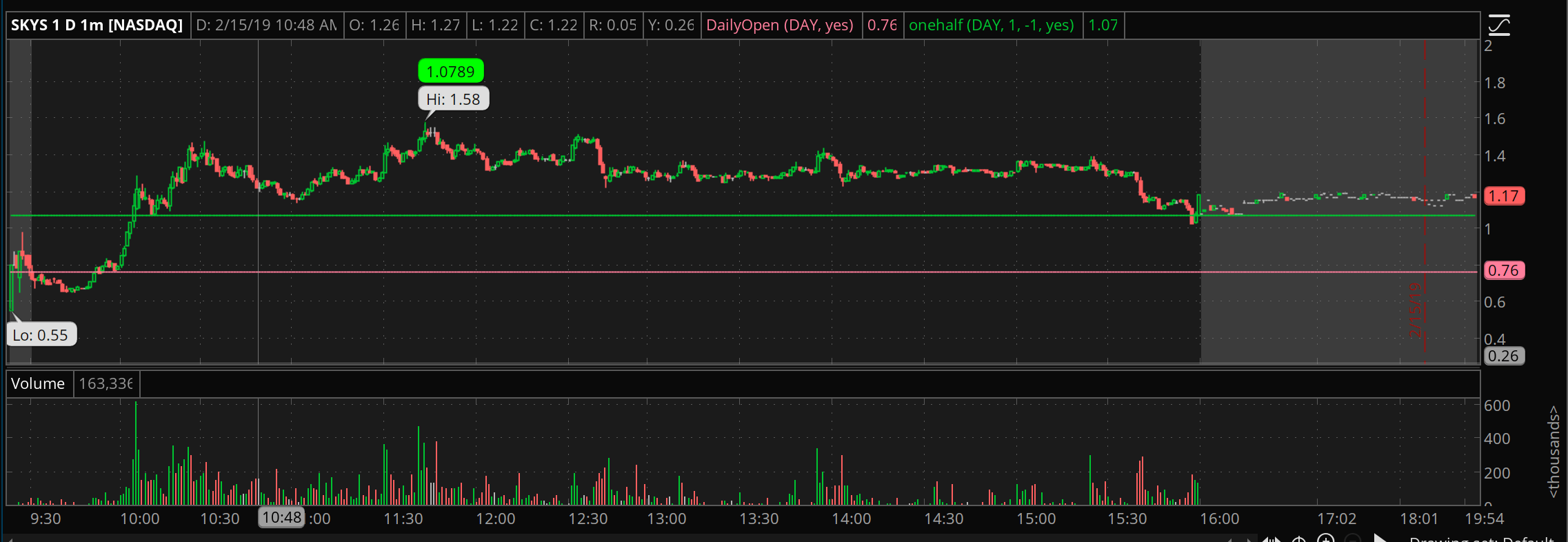
Adding a chart bubble as percent


Category:
0
0

Hello! I am new to thinkscript and I am having trouble finding a solution for this.

My question is whether or not it is possible to display this value as a % value in the bubble.

The bubble displays the gain from the day’s open to the day’s high.

The script I have so far is below

input timeFrame = {default DAY, “2 DAYS”, “3 DAYS”, “4 DAYS”, WEEK, MONTH, “OPT EXP”};

def open = reference DailyOpen;
AddChartBubble(high == high(period = timeFrame),high,(high – open) / open, Color.green, yes);

Attachments:
RESOLVED
Marked as spam
Posted by Ben Sherman (Questions: 1, Answers: 1)
Asked on February 17, 2019 10:59 am
306 views
0

I am very interested in this solution as well, I have the code that only works for an individual candle from, open to close.

(Juan Banderas at February 18, 2019 6:28 am)
0
Private answer

If your request is how to add the percent sign to the value then we can solve that. Not sure if that’s what you are asking, or if you are asking about how to compute the percent value correctly. So, let’s see what it takes to add a percent sign to the end of the value displayed in the chart bubble:

AddChartBubble(high == high(period = timeFrame), high, Concat((high – open) / open, "%"), Color.green, yes);

Marked as spam
Posted by Pete Hahn (Questions: 37, Answers: 4153)
Answered on February 18, 2019 1:51 pm
0

this solution is amazing. My only question, how can we round the results. For example, the current value is 0.4583% and I want it to display 46% instead (0.4583 x 100).

(Juan Banderas at February 18, 2019 2:38 pm)
0
Sorry the confusion in my original post. My question is regarding whether or not it is possible to compute the percent value correctly. Example being bubble displays 15% instead on 0.15 or in the example above 107% instead of 1.07
(Ben Sherman at February 18, 2019 2:57 pm)
0

I think this answers both followup questions:
AddChartBubble(high == high(period = timeFrame), high, Concat(Round(((high – open) / open) * 100, 2), “%”), Color.green, yes);

(Pete Hahn at February 20, 2019 11:26 am)
0

brilliant !!!

(Juan Banderas at February 20, 2019 1:01 pm)
0

Thank you so much! I would not have figured this out on my own. Thanks again ?

(Ben Sherman at February 20, 2019 3:05 pm)