| ♥ 0 |
Firstly thank you Pete for answering my previous question! I am testing on paper money a conditional round trip order in Forex. Buy to Open was on Friday, but on Saturday afternoon (thinkorswim maintenance period I assume), the linked Sell to Close order said Filled. Will I have to manually close this on Sunday when Forex resumes trading, and is this indicative of how round trip conditional forex trading over the weekend will perform on a live account?
Thanks again! RESOLVED
Marked as spam
 Posted by (Questions: 3, Answers: 1) Posted by (Questions: 3, Answers: 1) Asked on March 22, 2026 8:07 am
14 views
|
|
Private answer
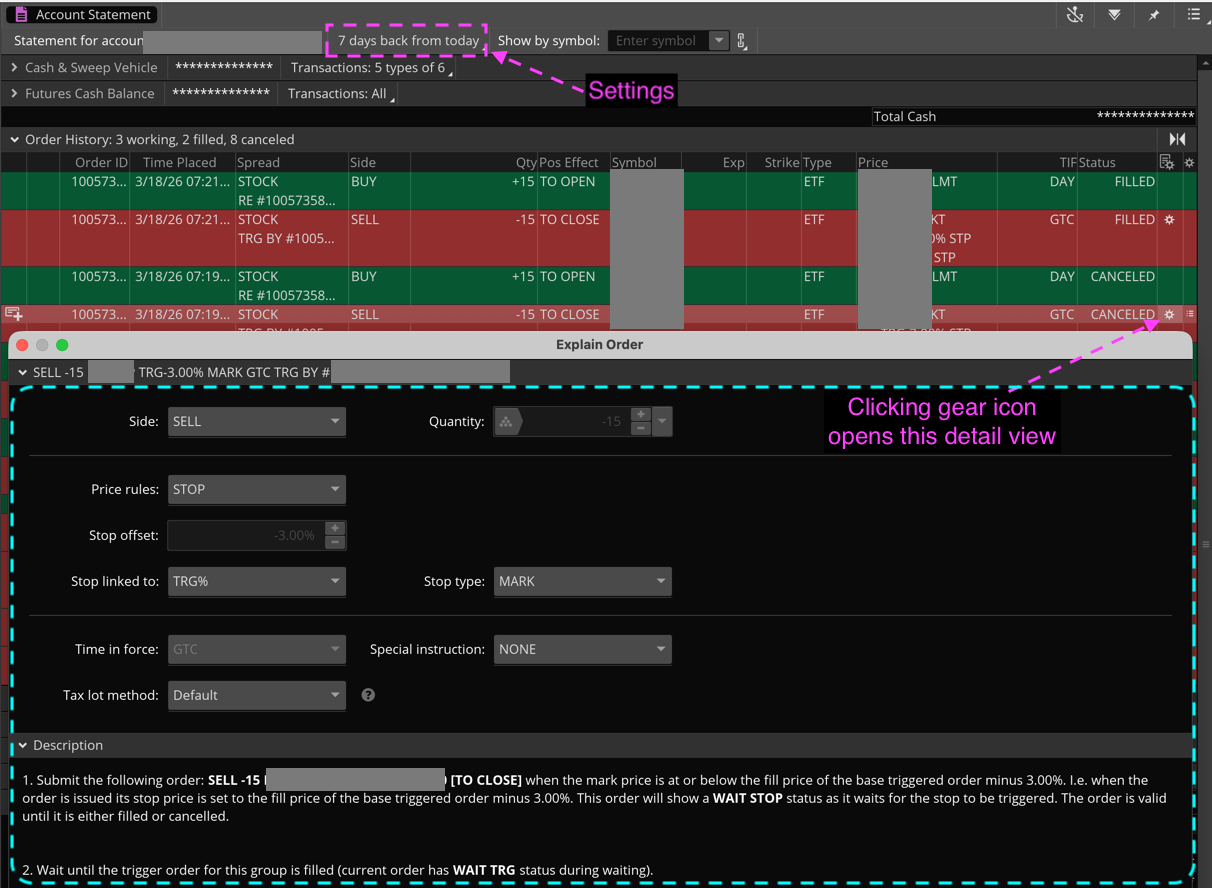
My own experience using conditional orders is for day trading futures. I have never used them to hold a position overnight. I say that so you understand my level of experience does not include the specific scenario you have encountered. Manual Intervention:Yes, if the attached order was canceled you will have to handle the exit manually. Or you may consider creating a new order to replace the one that was canceled. And once you lean how to view the "Order History", that can be done with a few clicks of your mouse. Time In Force (TIF):There are numerous reasons why the order may have been canceled and I can only cover a limited number of those reasons in this space (contact Thinkorswim support). But the most obvious reason my be that you had "Time In Force" (TIF) set to "DAY" instead of "GTC". So check that. If it was set to "DAY", then you need to contact Thinkorswim support for more in depth review and instructions. Order History:There is a section on Thinkorswim which allows you to view the "Order History". This includes orders which were canceled. And it provides method to view the original order conditions for each of those. The name of this view is "Account Statement". Here is a link to a resource published by Thinkorswim that describes this section of the platform: https://toslc.thinkorswim.com/center/howToTos/thinkManual/Monitor/Account-Statement#3_Order_History I also included a screenshot from my own account demonstrating how to view the detail on a cancelled order. Note that this is NOT from an automated trade using a conditional order script. But it does show how to open and view the details of a canceled order. There is a lot of information available and you just need to know how to access it. Where to Find Account Statement:To get to this "Account Statement" view. You simply go to the "Monitor" tab of Thinkorswim and click on the "Account Statement" sub-tab of that view. The settings at the top allow you to adjust the period of time you want included in the account history.
Attachments:
Marked as spam
 Posted by (Questions: 37, Answers: 4153) Posted by (Questions: 37, Answers: 4153) Answered on March 22, 2026 8:38 am
|