

Intraday Alerts At Overnight Highs and Lows
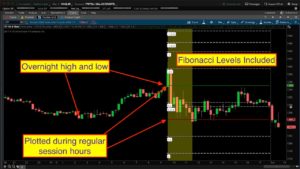
A quick Google search on the term “Overnight Range Trading Setups” nets some very interesting results. So I spent some time writing code and looking at charts. I think there is some real evidence to support the inclusion of the overnight range in your trading setups. I’m not here to show you how to trade the overnight range. However I did build you the best tool I can dream up, given my current knowledge and experience. The rest is up to you.
In this video named Thinkorswim Overnight Range Scan Alert, we show you many examples of how this tool may be applied. In addition to some special levels, we also include the ability to build custom scans based on its signals. As if that wasn’t enough, we throw in a bonus by showing how you can generate real time alerts based on the scan results. I am really excited to be able to present this material. I think this may end up being a valuable tool for many. It was a real eye-opener for me.
The code for the scan is included at the very bottom of this post. So be sure when you are done watching the video to scroll down past the video to get to that code. In the video we show you how to use that code to build your own custom scans, with alerts!
Link to study file is available on the Patreon post which is at the bottom of this post
Lean More:
Would you like to learn how to master the chart settings on Thinkorswim? Click here for our 3 part series: Thinkorswim Chart Settings Tutorial
*Thinkorswim is a chart analysis platform offered by Charles Schwab: https://www.schwab.com/
Charles Schwab provides financial services including the trading of Stocks, Futures, Options and Forex.
Please be sure to share this page with your friends and colleagues. Leaving comments below is the best way to help make the content of this site even better.
Watch the video, Thinkorswim Overnight Range Scan Alert below:
This content is only available to my Patreon subscribers at a level of $3 or higher. Click the image to the left to open this content directly on my Patreon page.
The custom script file included with this video is only available on this post in Patreon.
Thanks again for your continued support!
Is there a way to sound an alert when the stock crosses the 50% fib level (fib 5)?
Sorry but the Fibonacci levels were not included in the code used for the scan so there is no simple way to modify the existing code to scan for that specific event. It would require extensive modification.
Can you do 5 minute low and open rather the day high and low
Check our Q&A Forum for “Opening Range” solutions. This particular chart study is not able to perform as an opening range indicator.
HI Pete,
I’m just getting into making my own scanners and studies so I really appreciate your videos, great learning tools. I was curious if you could tell me how to edit the colored bars that show up for the premarket time periods?
Sorry but I really do not understand your question. What exactly did you mean by “edit”. And as far as “colored bars”… all of the bars on the chart are colored. So to say “edit the colored bars” is a bit of a mystery. The only thing I can imagine is that you want to color the bars that are in the premarket session a different color than the bars in the regular session? But that doesn’t make sense because you have set the chart to highlight the background of the entire extended hours session. Totally lost here.
Hello. Thank you so much for this script. I love the way price action respects these fibs. Quick question: is there a way to make the fibLables on the right side of the right expansion setting, similar to this code below?
input showBubble = yes;
input ShiftBubble = 5;
Def n1 = ShiftBubble+1;
def cond = showBubble and isNaN(close[ShiftBubble]) and !isNaN(close[n1]) ;
AddChartBubble(cond,PP,(“PP”),color.magenta);
Thanks,
Jonas
That modification is possible. But the current version places the labels based on the time of the regular session start.
Yeah, I loaded them into my charts but I don’t care for them coving up the first few minutes of trading. I thought if they were always to the right side of the screen, as you zoom in during the day, you can still see the bubble vs. they’re only at 9:30 ( ex: you can’t see them if you zoom in around 1pm)
And you can them completely off through user settings. Most folks don’t need them there all the time. Just long enough to get used to the layout.
do you have a thinkscript for scan demark sequence counter?
Sure don’t. Never even heard of it.
you ever find one?
Just wondering how that would help as 9/10 the previous days or o/n levels are quite different to the current o/n levels?
Love your work.. I have a question for you, Is it possible to add next day plots so you can get a prediction of the next cpl or just the next day would be sweet.. thanks again for all you do
So are you just asking if the lines plotted for today could be extended to the right into the following day? Trying to understand what you are describing here.
Yes that would work sweet im trying at this moment to intergrate auto trend lines as well
Good stuff Pete.
Thank you!
PC