

Organize and Save Thinkorswim Charts Across Multiple Monitors
UPDATE 11/15/25: I recently published a new updated video on this topic (6 minutes)
Click the following link to view the updated video: TOS Mini’s Multiple Monitors
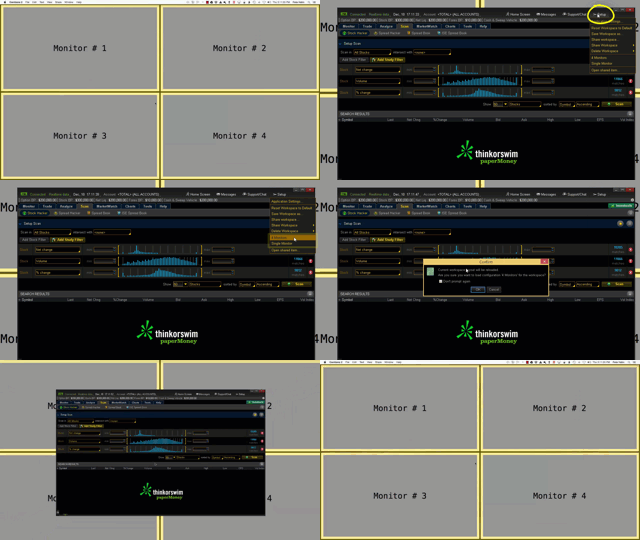
Thinkorswim Multiple Monitors
This video is part 3 in the series in which I demonstrate how to detach windows in the Thinkorswim platform. Once detached, I then assign each window to display in a separate section. I use those four separate spaces to demonstrate how to distribute them across four separate monitors. In this video I also teach you how to save that as a workspace layout. Once saved, it remembers where each window is placed. You can then reload that saved workspace at any time or switch between multiple workspaces you have saved.
Other Videos In This Series:
Saving Chart Grid Layout
In part 1 you learn how to configure and save chart settings. Part 1 also demonstrates how to save chart settings as a custom style. This custom style is then used to quickly configure additional charts. You will also learn how to customize and save the chart grid layout.
Saving Flexible Grid Layout
Part 2 of this series builds on the work of part 1. It demonstrates how to configure and save chart layouts in the Flexible Grid screen of the Thinkorswim platform.
DISCLAIMER: I AM NOT A CERTIFIED FINANCIAL ADVISOR AND NOTHING IN THIS VIDEO OR TEXT IS AN ADVERTISEMENT OR RECOMMENDATION TO BUY OR SELL ANY FINANCIAL INSTRUMENT. NOR IS THIS VIDEO OR TEXT INTENDED TO INSTRUCT YOU ON HOW TO MAKE BUY OR SELL DECISIONS USING ANY OF THESE INDICATORS.
*Thinkorswim is a chart analysis platform offered by Charles Schwab: https://www.schwab.com/
Charles Schwab provides financial services including the trading of Stocks, Futures, Options and Forex.
Please be sure to share this page with your friends and colleagues. Leaving comments below is the best way to help make the content of this site even better.
can you create a connection between the risk and reward pull down box and the actual placement of the trade using this box, maybe adding a close or sell box to get out of the trade, in other words– creating a pull down box that can get you into a trade, a stop and a sell order with maybe an adjustable trailing stop.
Those sorts of things can only be created by the developers of Thinkorswim. This is not something which we can modify as an end user of the platform. So I suggest you submit this to Thinkorswim support as a feature request.
Thank you, excellent videos, studied these 3, just confused about user defined studies as I have none yet, and also would love the link to get the grid name on chart study, thanks again. We’ll put?
The link is provided in the description of the video that covers that topic.
how did you get to 1:35?
This is part 3. We got to the view you see at the 1:35 mark during parts 1 and 2.
Thank you for all your great videos. I would love to display my charts on a second monitor, but every time I do, the TOS platform starts to “overheat” my Macbook Pro, that has 16 RAM (High Sierra). I have read somewhere that Think or Swim does not assign enough memeory for the Java Platfrom when running multiple screens. How/Where can I adjust the settings to fix the problem?
That is done from the login screen. Before you enter name a password and logon. Check for a gear icon or a settings button.
Hi, i need help with thinkorswim platform. I’m trying to create an alert for high/lows on a specific time frame. We already get a high/low marker but how can i get notified when a new high or a new low is reached? Can you please help me out with that. I’ve tried everywhere to find the answer with no luck and when i ask, no one seems to know. Is it even possible to do so?
how can I get indicator you made
Thanks for stopping by the website. I understand you are interested in one of the indicators displayed in the video titled “Thinkorswim Multiple Monitors”. There are many, so please describe which indicator has your interest and we will do our best to assist you.